
Edits: Video Editor review
 Analysis by GetAllApps
I approached Edits as a focused mobile video editor rather than assuming it would replace every tool I use. That distinction matters: Instagram’s app is aimed at making and shaping video on a phone, with a natural fit for people who already create clips for social platforms. My impression is that it makes most sense when I want to move from an idea to a finished short video without turning editing into a separate project.
A practical editor for quick video decisions
Edits sits in the video-player-and-editor space, but its identity is firmly on the editing side. Instagram developed it as a free app, and its appeal is straightforward: open a video project, make creative choices, and prepare something to share. It is rated for Everyone, so it is broadly accessible, though parents should still consider how any video-sharing workflow fits their household’s rules.
The app has a 4.7 average from around 1.9 million ratings and more than 100 million installs. Those figures suggest that it has reached a large audience, but they do not tell me whether its editing approach suits a particular person. I would judge that by the kind of work you make: short, visually clear clips are a more natural match than elaborate films with layered sound design or precise, frame-by-frame finishing.
In everyday use, the key benefit of a mobile editor is not simply that it can trim footage. It is that editing can happen while the material is still fresh. If I record a few moments on the way to meet a friend, I can select the useful pieces, establish a sensible order, and make a compact video before the evening is over. That immediacy can be more valuable than a long list of controls I rarely use.
Where it fits in a creator’s routine
I see Edits working best as a bridge between recording and publishing. It can be the place where I decide what the clip is actually about: which moment should open, what can be removed, and whether the ending feels deliberate. Those choices often improve a short video more than adding another decorative effect.
A useful habit is to make a rough cut before worrying about polish. I would first remove pauses and repeated shots, then watch the sequence once without stopping. If the point is clear even without extra decoration, the basic structure is doing its job. Only then would I adjust the presentation. This order avoids spending time refining a section that should have been cut.
For a small business owner, that could mean shaping a quick product demonstration after filming it on a phone. For a student, it might mean assembling a short recap of a club activity. For someone documenting a trip, it offers a way to turn scattered footage into a compact memory rather than leaving every clip untouched in the camera roll. In each case, the value is a manageable editing step, not a promise of professional post-production.
What the current release tells me
The current version is 452.0.0.50.64, and the app was released on April 21, 2025. Those details establish the current release context, but they do not by themselves prove how a particular editing feature has changed or what is coming next. I would avoid treating a version number as a feature roadmap. The practical question is whether the editor available on your device supports the workflow you want today.
For people who have already used Edits, the most useful way to evaluate an update is to compare the tasks they perform regularly, not just the version label. Can they still get from selected footage to a coherent cut without unwanted detours? Does the experience feel comfortable for the length of video they typically make? Those checks are more meaningful than assuming every new version must bring a visible overhaul.
For a first-time user, the current release is simply the starting point. I would begin with a short, low-stakes project rather than importing a large collection of footage and expecting the app to organize the whole job. A test clip reveals whether the controls, pacing, and overall workflow feel intuitive to you before you commit to editing something important.
How I would approach a real editing session
Imagine I have recorded a few brief clips at a weekend market: a wide view, a close-up of something interesting, and a moment that captures the atmosphere. I would not begin by trying to use every option. I would first choose the shots that communicate the same small story, put them in an order that makes sense, and trim away the moments before and after the useful action.
Then I would watch the video as a viewer, not as its editor. Does the first shot give enough context? Does the close-up arrive before the viewer loses interest? Does the ending feel complete, or does it stop abruptly? This simple review pass is a concrete advantage of working on a phone: I can judge the finished piece in the same casual setting where many people will watch it.
One less obvious trade-off is that editing on a small screen makes quick decisions easy but detailed comparisons harder. When choosing between two similar takes, I would keep the candidate clips brief and compare them immediately rather than relying on memory. If I am making a project with many near-identical shots, a larger-screen editor may be more comfortable for careful selection.
Another useful discipline is to keep the project’s purpose narrow. A short clip about one moment usually holds together better than a collection of unrelated highlights. I would pick a central idea before editing—such as showing how a dish is prepared or capturing the mood of a place—and remove footage that does not support it. Edits can help shape a video, but no editor can make unrelated material feel coherent by itself.
How it compares with familiar alternatives
Compared with the usual choices in mobile video editing, Edits is most compelling for someone who wants a direct, phone-based route to a social-ready result. A general-purpose desktop editor is preferable when I need extensive timeline control, detailed audio work, or a complicated sequence. A lightweight trimming tool can be faster when all I need is to shorten one recording. The right choice depends less on which app has the longest feature list and more on how much control the project actually needs.
Edits also has a different role from simply posting a clip without much editing. Posting directly is convenient when the footage already works as captured. Editing first is worthwhile when the story needs a better order, a tighter pace, or a more purposeful finish. I would not add an editing step just because an editor is available; for a spontaneous moment, the unedited version may feel more genuine.
Because Instagram is the developer, the app is an obvious consideration for people whose video-making habits already revolve around that ecosystem. Still, I would choose a tool based on the finished result and the comfort of the workflow, not on the developer’s name alone. If you regularly move projects between different devices or need a specialized production setup, compare those requirements before making Edits your only editor.
Who is likely to enjoy it—and who may not
I would recommend Edits to casual creators, small teams making simple promotional clips, and anyone who wants to turn phone footage into a more intentional short video. It is especially appealing if you tend to film in the moment and prefer to edit soon afterward. The free entry point makes it easy to try for a modest project before deciding whether it belongs in your routine.
I would be more cautious if my work depends on exact control over many layers, extensive sound mixing, or a carefully managed workflow across a large collection of footage. In those situations, a more specialized editor, often on a larger screen, is the better choice. Likewise, if I only need to cut a few seconds from a video, using a full editor may be unnecessary friction.
The app includes in-app purchases, with listed items ranging from $0.99 to $1,049.00 each. That broad range makes it sensible to check what an offered purchase covers before confirming anything, especially if you are installing the app for a simple occasional task. The app itself is free, but I would not assume that every optional item is relevant or necessary to finish a basic edit.
Small habits that make the workflow smoother
Before opening the editor, I would decide what the viewer should remember. That one-sentence goal helps me reject attractive but irrelevant footage. I would also make a rough sequence first and leave visual refinements until the pacing feels right. These are small choices, but they prevent the common trap of spending more effort decorating a video than clarifying it.
If the final clip is intended for a social feed, I would review it at the size and speed at which people are likely to watch: on a phone, with only a moment to understand the opening. A clean first shot and a quick sense of subject matter can matter more than a complicated beginning. I would also watch the ending once before sharing, since an accidental-feeling stop can make an otherwise polished clip seem unfinished.
For a recurring format—weekly updates, event recaps, or short demonstrations—I would keep the structure consistent from one project to the next. Consistency makes future editing faster and gives viewers a familiar rhythm, without requiring every video to look identical. The trade-off is that a template-like routine can become stale, so I would vary the subject or pacing when the material calls for it.
What I would keep an eye on
For existing users, I would watch whether future updates improve the parts of editing that affect daily use: getting to the right clip, making clear timing decisions, and finishing a project without unnecessary steps. Those are the areas that determine whether an app becomes a dependable habit. I would treat any expectations about new capabilities as expectations, not as reasons to choose the current version.
For newcomers, my advice is simpler: try a small project that resembles what you genuinely want to make. If you can shape the footage comfortably and the result looks right for your intended audience, Edits is earning its place on your phone. If you repeatedly hit the limits of mobile editing or need controls that are easier to manage on a computer, moving to a more advanced alternative is a sensible next step, not a failure of the app.
My overall view is that Edits is a worthwhile option for people who want to make short videos on their phones and care about turning raw moments into a clearer story. Its strongest case is convenience paired with deliberate editing, not replacing every specialized tool. I would start with one everyday clip, keep the edit focused, and decide from that experience whether its workflow matches the way you create.
Pros and cons
Pros
- Free to download with no subscription required for core editing tools.
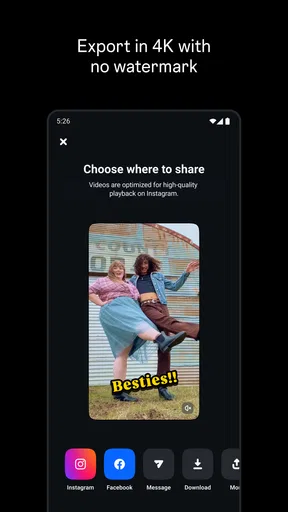
- Exports videos without a watermark.
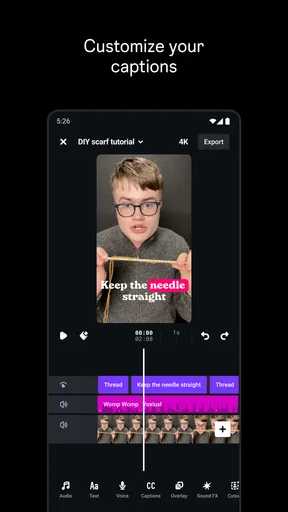
- Offers precise control over individual clips and timeline edits.
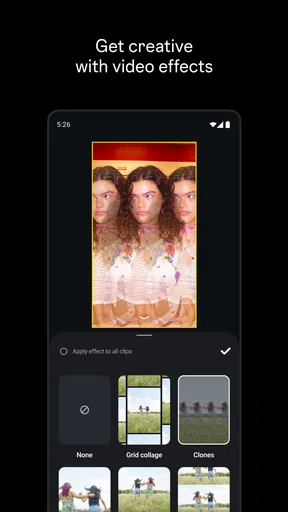
- Includes ready-made presets for quick video adjustments.
- Supports high-resolution video exports up to 4K.
Cons
- Requires an Instagram account to use the app.
- Some advanced features depend on an internet connection.
- Can use significant storage when saving large video projects.
- May feel complex for users who only need simple edits.
- Availability and features may vary by device and region.


